
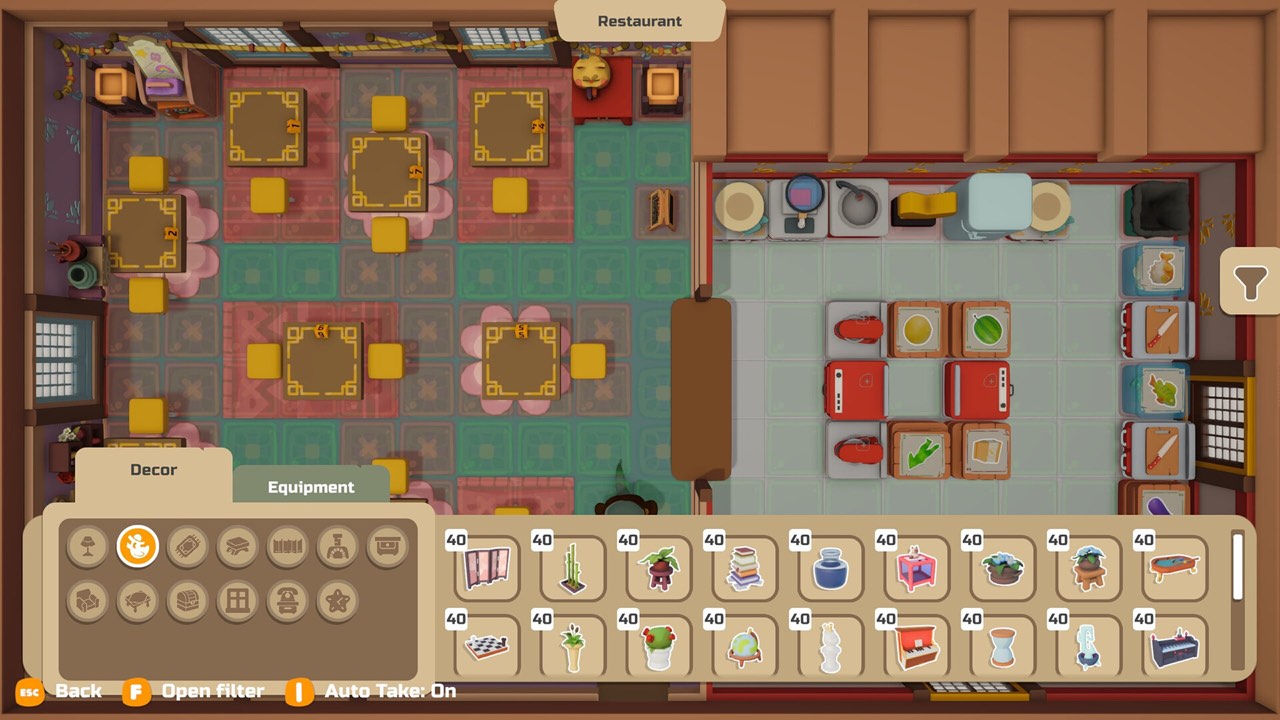
Why layout matters in PAO PAO
PAO PAO lets you customize your restaurant, and the developer advertises it as a core feature. How you arrange stations affects how quickly you can move between ingredients, cooking and serving. A messy kitchen means more walking, slower orders and more chances to get stuck behind your own furniture.
Both recent demo creators ran into layout problems during service. In each case the issue was access, not decoration. That pattern is the basis for the advice on this page.
Edit before you open
The most important layout rule comes straight from the footage. In a September 27, 2026 session, at about 21:10, NAC Games discovers that editing is unavailable while the restaurant is open. Any change you want to make has to wait until service is over.
That means planning matters more than fixing on the fly. Before opening each day, check that every station your menu needs is placed and reachable. Make a habit of a quick walk-through of the kitchen before you flip the sign.
A proposed starter workflow
The following flow is our suggestion, not an in-game measured blueprint. It follows the order in which a dish is made, so you move forward rather than back and forth. Cleaning gets its own route so dirty dishes do not cross the path of food being plated.
| Step | Station | Why it sits here |
|---|---|---|
| 1 | Ingredient storage | Start of every dish; keep it reachable from the door and prep area. |
| 2 | Preparation | Slicing and other prep happen right after taking ingredients. |
| 3 | Cooking | Next to prep so prepared food moves a short distance. |
| 4 | Plating | Between cooking and the dining room. |
| 5 | Service | Plated dishes go out to customers. |
| Separate | Cleaning | Its own path so washing does not block the food line. |
Adjust the order to match the stations your menu actually uses. Simple dishes like catfish sashimi only need storage, preparation and plating. Add stations as your menu grows rather than filling the kitchen on day one.
Keep storage reachable
Ingredient boxes are the starting point for every order, so they need open access. In the September footage, at about 32:20, a box is difficult to reach during service. That small obstruction slowed down every dish that needed what was inside.
Place storage where you can approach it without squeezing past other stations. If you notice yourself walking around furniture to reach ingredients, move it at the end of the day. Accessible storage is one of the simplest improvements you can make.
Don't let bins and boxes block paths
Becktoriiia's October 22, 2026 session shows the same lesson from another creator. Between about 35:23 and 36:06, she moves ingredient boxes and a bin that was getting in the way. Access clearly took priority over decoration once service pressure increased.
Bins, crates and decorations can quietly narrow your walkways. Leave clear aisles between the main stations so you can move in a straight line. Decorate the dining room freely, but keep the kitchen practical.
Match the layout to your menu
Your layout and your menu should be planned together. Becktoriiia's chosen menu, at around 17:02 to 17:30, exposes equipment needs she has to address. Every recipe depends on specific stations, so a missing one only shows up when the order arrives.
Read the cookbook for each dish before deciding where stations go. A short menu needs fewer stations, which leaves more room to move. The recipes guide explains how to check what each dish requires.
Solo versus co-op layouts
A layout that works alone may feel crowded with friends. PAO PAO supports online co-op for up to four players, and more cooks mean more bodies moving through the same space. Give each main station enough room that two players are not fighting over one spot.
Players have also reported getting pushed into kitchen corners by other characters in co-op. ArtDock acknowledged that collision problem in March 2025. Clear aisles are a sensible preventive habit, though not an officially tested fix; read the player collision guide for details.
Known layout issues and fixes
In June 2026, players reported that kitchen appliances reset after a restaurant expansion. That report is a historical player account, not a current developer-confirmed issue. If it happens to you, note where your stations were before expanding.
The October 1, 2026 patch addressed an editing-related item-loss issue. That fix is separate from the expansion reset reports, so it does not prove the older problem is solved. Check your layout after any expansion and report problems to the developer with your build details.
Service pressure and layout
Layout matters most when orders pile up. LadiesGamers' January 2026 impressions describe setting up the restaurant and then managing the pressure of service. Every unnecessary step in a busy shift costs time you could spend on the next order.
That pressure is why a simple, linear workflow tends to feel better than a crowded one. Keep the busiest stations close together, and move rarely used items to the edges. Review your layout after each shift while the bottlenecks are fresh in your mind.
Layout and income
A smooth kitchen helps you serve more customers, which is the clearest verified income route. Fewer delays mean fewer failed dishes and less wasted food. Good layout does not earn money directly, but it supports everything that does.
For the full picture on earning, read how to make money in PAO PAO. It explains how menu size, workflow and selling surplus fit together. The beginner guide shows where layout planning fits into your first day.
What is not confirmed
Several layout details players ask about have not been verified. There is no confirmed optimal grid, expansion price, exact counter distance or universally safe aisle width for multiplayer. The workflow table above is a proposal, not a measurement taken from the game.
This page will be updated when the Early Access version is documented. If you find a layout that works especially well, our contact page is open for screenshots. Until then, prioritize access, plan before opening and keep the kitchen clear.
Sources and further reading
- PAO PAO — ArtDock
- Just a Cozy Lil Guy Running a Chaotic Restaurant! — NAC Games
- This Cosy Restaurant Game Is ADORABLE!! — Becktoriiia
- New Player — Steam developer reply
- PAO PAO Feels Like Overcooked, But With More Charm — Cozy Escapism
- Pao Pao free demo is now available to play! — Dreland
- Player collision / stuck in a kitchen corner — Steam discussion
- Kitchen Appliances Layout Reset — Steam discussion
- Pao Pao Second Patch is Live!
- PAO PAO Demo Impressions — LadiesGamers