
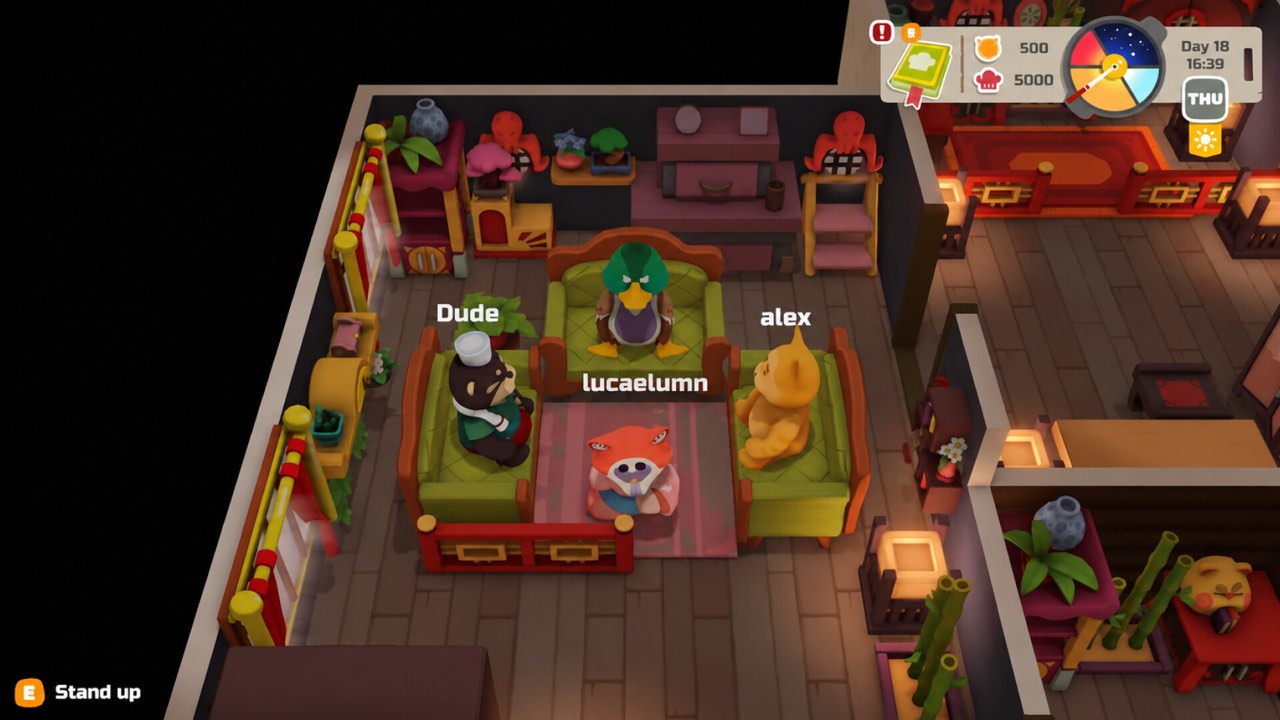
How many players can join
The player limit is four, counting the person hosting the session. Dreland Enterprises, the publisher, explicitly describes the game as playable solo or in co-op for up to four players. The Steam store lists online co-op on the main PAO PAO page. Both sources were checked on October 25, 2026.
That means you can bring up to three friends into your restaurant. A smaller group works too, and the game remains fully playable alone. Choose whatever group size suits your schedule. The same restaurant tasks apply whether you play alone or with a full group.
Online co-op versus local co-op
PAO PAO's advertised multiplayer is online co-op. Local split-screen or couch co-op is not listed on the current store page. Players asked about local play on the Steam forum in February 2025. The question came up early because many cozy cooking games offer couch play.
On February 26, 2025, a developer named SHISHKOFF replied that local co-op was not planned at that time. That answer is historical and concerns local play, not the online mode. It should not be read as a permanent promise about future development, but local co-op is not confirmed today.
Sharing restaurant work with friends
Co-op is about dividing the restaurant workload. Cozy Escapism's impressions of an earlier demo describe friends splitting restaurant tasks between them. Cooking, serving, cleaning and gathering can each become one player's job. Spreading the work out lets the restaurant handle more orders without anyone feeling overwhelmed.
Solo footage shows how much work a single shift involves. Becktoriiia's October 22, 2026 session shows one player juggling preparation, cooking and washing up. Those same tasks are what a group can divide, although a solo video is not proof of how multiplayer synchronization behaves.
A simple way to split roles
Before opening, agree on the daily menu and who handles what. One sensible split is a cook, a server, a cleaner and a gatherer, though smaller groups can combine roles. The key is that everyone knows which part of the workflow is theirs. Roles can change from day to day as your menu and group size change.
Gathering is an easy role to hand off. One player can buy groceries, fish or tend the garden while the others prepare the kitchen. Our fishing guide and farming guide cover those activities. Bringing ingredients back before opening keeps the kitchen stocked for the whole shift.
Lobby codes and joining
Joining a friend involves lobby codes, which are a verified multiplayer term in PAO PAO. The September 18, 2026 demo patch fixed entering lobby codes using the Steam keyboard. That fix helps players using the on-screen keyboard to join a session. It was one of several network-related changes made in the weeks before launch.
Lobby codes are for multiplayer access only. They are not reward or redeem codes and do not unlock free items. Our codes guide explains the difference in more detail. Be wary of any site that claims lobby codes give rewards.
Fixes in the October 2026 patch
The October 1, 2026 patch included several multiplayer fixes. It addressed problems joining private lobbies and improved network synchronization. Money synchronization in multiplayer was also fixed. Together, these changes target the problems most likely to interrupt an online session.
These are documented improvements, not a guarantee that every connection problem is resolved. If you had trouble joining a friend in an older build, it is worth trying again on the current version. Persistent issues are best reported on the official Steam community or ArtDock Discord.
Getting stuck on other players
Shared kitchens can get crowded, and collision has been an issue in the past. In March 2025, ArtDock acknowledged a report of a player being pushed into a kitchen corner by another character. The suggested workarounds at the time were resetting the level or restarting the game. Saving first, where possible, is the safer approach before restarting.
No current setting to turn player collision off has been verified. Keeping aisles clear is a sensible preventive habit, though not an officially tested fix. Read the player collision guide for the full history and reporting tips.
Layout tips for groups
A layout that works for one player can feel cramped with four. Give each main station room so two players are not competing for the same spot. Separate the cleaning route from the food line so dishwashers do not block cooks. A little extra space goes a long way when four characters share one kitchen.
Finish all layout changes before opening, because editing is unavailable during service. Agree on any rearrangement together at the end of the day. The restaurant layout guide includes a proposed starter workflow you can adapt for groups.
Trying co-op in the free demo
You do not need to buy the game to test co-op with friends. The publisher confirms that the free demo supports solo play or co-op for up to four players. That makes the demo a good way to check whether your group enjoys the restaurant pace. It also lets everyone learn the controls before launch day.
The demo is available through the official Steam page. The September 2026 patch notes also state that demo saves can transfer to the full version. See the demo guide and the demo save transfer guide for details.
Co-op at the Early Access launch
PAO PAO is scheduled to enter Steam Early Access on October 26, 2026. Online co-op is listed on the main store page, so it is part of the game you can expect at launch. Early Access also means features may continue to change after release.
If something in co-op behaves differently from this guide, check the official news feed for new patch notes. Fixes like the October 2026 lobby and sync changes are announced there. We will update this page as new multiplayer changes are confirmed.
What is not confirmed
Some co-op questions do not have verified answers yet. Cross-console play has not been verified, and the current step-by-step sequence for creating a lobby was not documented. How progress is owned by the host and guests has not been confirmed either. These are reasonable questions, but guessing at them would mislead players.
This page avoids presenting a solo recording as a multiplayer test. When the Early Access version is documented, verified co-op details will be added with sources. Until then, the four-player online limit is the firm answer. Check the official Steam page for any changes after launch.
Sources and further reading
- Pao Pao free demo is now available to play! — Dreland
- PAO PAO — Steam store
- Looks adorable — local co-op discussion
- PAO PAO Feels Like Overcooked, But With More Charm — Cozy Escapism
- This Cosy Restaurant Game Is ADORABLE!! — Becktoriiia
- PAO PAO DEMO Patchnote
- Pao Pao Second Patch is Live!
- Player collision / stuck in a kitchen corner — Steam discussion
- Just a Cozy Lil Guy Running a Chaotic Restaurant! — NAC Games
- Pao Pao Launches in 3 Days!
- PAO PAO — Official Release Date Trailer — IGN